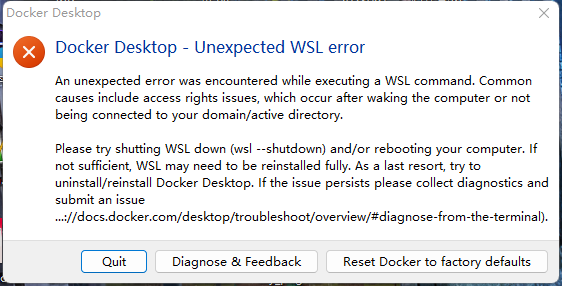
windows安装docker出现报错 解决办法 An unexpected error was encountered while executing a WSL command. Common causes include access rights issues, which occur after waking the computer or not being connected to your domain/active directory. Please try shutting WSL down (wsl --shutdown) and/or rebooting your computer. If not sufficient, WSL may need to be reinstalled fully. As a last resort, try to uninstall/reinstall Docker Desktop. If the issue persists please collect diagnostics and submit an issue (https://docs.docker.com/desktop/troubleshoot/overview/#diagnose-from-the-terminal). 1.以下操作在window powershell的管理员权限下进行,首先要确保wsl安装正确 wsl -l #list wsl installed wsl --update2.其次更新网络设置 netsh winsock reset
jshgtfrddh2年前0
你的文章让我感受到了不一样的视角,非常精彩。 https://www.yonboz.com/video/84282.htmlukfbunfxqk2年前0
你的文章让我感受到了不一样的视角,非常精彩。 https://www.yonboz.com/video/23752.htmldmtrqccbnn2年前0
你的文章内容非常卖力,让人点赞。 http://www.55baobei.com/l1t7Yd5s6H.htmlxsuhtbbzmm2年前0
你的文章让我感受到了不一样的视角,非常精彩。 https://www.4006400989.com/qyvideo/92199.htmlceskjhtfrd2年前0
你的文章内容非常卖力,让人点赞。 http://www.55baobei.com/l1t7Yd5s6H.html