首页
文章分类
源码资源
技术教程
程序软件
文创娱乐
公告通知
其他页面
友情链接
闲聊灌水
关于我们
发布
登录
注册
找回密码
首页
文章分类
源码资源
技术教程
程序软件
文创娱乐
公告通知
其他页面
友情链接
闲聊灌水
关于我们
登录
注册
找回密码
28
1
更多资料
搜索内容
韩昊杰
管理员
这家伙很懒,什么都没有写...
关注
私信
文章
66
收藏
0
评论
1
粉丝
0
排序
最新发布
最近更新
最多查看
最多点赞
最多回复
最多收藏
销售数量
display:flex 小程序简易使用方法
display:flex 小程序简易使用方法 开发微信小程序,遇到了图片的一些问题,比如在某些界面中要求图片水平居中、垂直居中,在某些界面中要求图片铺满全屏幕。.wxml文件 <view class='imagebox'> <image src="/images/1.png" mode="widthFix"> </image> </view> 图片水平居中 .imagebox{ display:flex; /*设置为flex布局*/ justify-content: center; /*水平居中*/ } .imagebox image { width:300rpx; height:300rpx; } 图片垂直居中 .imagebox{ display:flex; height: 500px; justify-content: center;/*水平居中*/ align-items:center; /*垂直居中*/ } .imagebox image { width:300rpx; height:300rpx; } 图片居中铺满全屏幕 page{ height:100%; /*设置高度100%,达到满屏状态*/ } .imagebox{ display:flex; height: 100%;/*重点,铺满全屏*/ justify-content: center; align-items:center; } .imagebox image { width:300rpx; height:300rpx; } 元素垂直居中 .data{ display: flex; justify-content: center; flex-direction:column; align-items:center; }
前端大杂烩
韩昊杰
4年前
0
1
0
PHP微擎简易导表程序
display:flex 小程序简易使用方法 开发微信小程序,遇到了图片的一些问题,比如在某些界面中要求图片水平居中、垂直居中,在某些界面中要求图片铺满全屏幕。.wxml文件 <view class='imagebox'> <image src="/images/1.png" mode="widthFix"> </image> </view> 图片水平居中 .imagebox{ display:flex; /*设置为flex布局*/ justify-content: center; /*水平居中*/ } .imagebox image { width:300rpx; height:300rpx; } 图片垂直居中 .imagebox{ display:flex; height: 500px; justify-content: center;/*水平居中*/ align-items:center; /*垂直居中*/ } .imagebox image { width:300rpx; height:300rpx; } 图片居中铺满全屏幕 page{ height:100%; /*设置高度100%,达到满屏状态*/ } .imagebox{ display:flex; height: 100%;/*重点,铺满全屏*/ justify-content: center; align-items:center; } .imagebox image { width:300rpx; height:300rpx; } 元素垂直居中 .data{ display: flex; justify-content: center; flex-direction:column; align-items:center; }
php
韩昊杰
4年前
0
0
0
抖音userid怎么获取
display:flex 小程序简易使用方法 开发微信小程序,遇到了图片的一些问题,比如在某些界面中要求图片水平居中、垂直居中,在某些界面中要求图片铺满全屏幕。.wxml文件 <view class='imagebox'> <image src="/images/1.png" mode="widthFix"> </image> </view> 图片水平居中 .imagebox{ display:flex; /*设置为flex布局*/ justify-content: center; /*水平居中*/ } .imagebox image { width:300rpx; height:300rpx; } 图片垂直居中 .imagebox{ display:flex; height: 500px; justify-content: center;/*水平居中*/ align-items:center; /*垂直居中*/ } .imagebox image { width:300rpx; height:300rpx; } 图片居中铺满全屏幕 page{ height:100%; /*设置高度100%,达到满屏状态*/ } .imagebox{ display:flex; height: 100%;/*重点,铺满全屏*/ justify-content: center; align-items:center; } .imagebox image { width:300rpx; height:300rpx; } 元素垂直居中 .data{ display: flex; justify-content: center; flex-direction:column; align-items:center; }
其他
韩昊杰
4年前
7
1
0
[go语言]百度翻译软件
display:flex 小程序简易使用方法 开发微信小程序,遇到了图片的一些问题,比如在某些界面中要求图片水平居中、垂直居中,在某些界面中要求图片铺满全屏幕。.wxml文件 <view class='imagebox'> <image src="/images/1.png" mode="widthFix"> </image> </view> 图片水平居中 .imagebox{ display:flex; /*设置为flex布局*/ justify-content: center; /*水平居中*/ } .imagebox image { width:300rpx; height:300rpx; } 图片垂直居中 .imagebox{ display:flex; height: 500px; justify-content: center;/*水平居中*/ align-items:center; /*垂直居中*/ } .imagebox image { width:300rpx; height:300rpx; } 图片居中铺满全屏幕 page{ height:100%; /*设置高度100%,达到满屏状态*/ } .imagebox{ display:flex; height: 100%;/*重点,铺满全屏*/ justify-content: center; align-items:center; } .imagebox image { width:300rpx; height:300rpx; } 元素垂直居中 .data{ display: flex; justify-content: center; flex-direction:column; align-items:center; }
韩昊杰的软件
韩昊杰
4年前
0
0
0
武汉理工刷课,武汉理工大学刷课,刷在线作业程序
武汉理工大学刷课时,刷课插件,免费提供给大家我是韩昊杰,武汉理工大学刷题,武汉理工大学刷课,武汉理工大学题库,武汉理工大学刷课时
韩昊杰的软件
韩昊杰
4年前
11
1
0
上一页
1
...
11
12
13
14
下一页
在手机上浏览此页面
退出登录
您好!
确认要退出当前登录吗?
取消
确认退出
我是韩昊杰
一个一直在用心写代码的程序员
必须认同
认同吧

 4年前
4年前 4年前
4年前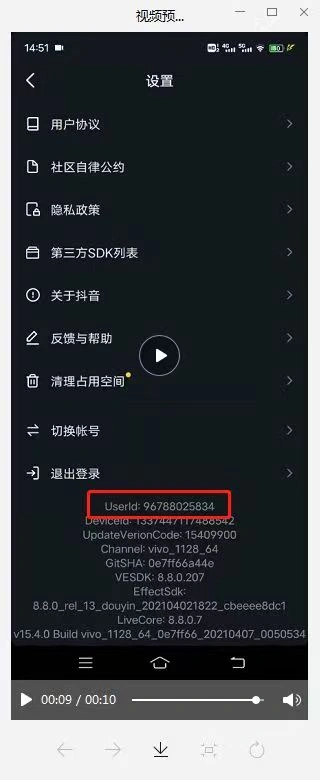 4年前
4年前![[go语言]百度翻译软件-辛达科技-一个只分享技术的站](http://www.hanhaojie.top/usr/uploads/2022/04/1322036515.png) 4年前
4年前